
Some AI visibility report templates are built around a single headline score. One popular framework for GEO reporting to agency clients even recommends making the overall score the centerpiece of the report and tracking it period over period.
The appeal is understandable, because one number is simple to present and easy for a client to understand.
The problem is what that number usually contains. It tends to average several AI models together, it changes whenever prompts are added or removed, and it reflects whatever answer a model gave on the day it was checked. A report built around this can show progress where there has been none, or a decline caused by nothing more than the agency tracking more ambitious topics.
We built Traqer because we needed a way to report to clients at our agency, Grow and Convert. In our experience, the AI visibility reports that stand up to scrutiny:
Are organized around priority buying topics, rather than simple prompts
Read each LLM separately
Treat brand mentions as the goal
Look at performance through time, across multiple runs of a prompt
Connect AI visibility to business results (i.e., leads/sales)
This guide sets out what we think belongs in a monthly AI visibility report, the order we put it in, what we leave out, and how a monthly report relates to the weekly data underneath it.
Why standard AI visibility reports can mislead clients
Three problems recur when we look at AI visibility reports from elsewhere:
A blended score averages models that behave very differently. Google AI Overviews and Perplexity work largely as summaries of search results, so a brand with strong SEO tends to do reasonably well on them. ChatGPT leans more on its training data, and a brand’s visibility there often looks quite different. For one former Grow and Convert client in call center software, the same prompt, run 36 times on each model, mentioned the brand 74% of the time in AI Overviews and 39% of the time in ChatGPT. The average of the two describes neither model.
A visibility percentage has a denominator the agency controls. Add ten prompts the client doesn’t yet appear for and the figure drops. Remove the weakest prompts and it rises. You report 44% on one call, expand tracking into new topics, and on the next call the client asks why visibility fell, when nothing about the brand’s standing in AI answers has changed.
Finally, AI answers change from one run to the next. Research that collected 2,961 responses to 12 recommendation prompts across ChatGPT, Claude and Google’s AI, found less than a 1 in 100 chance of the same list of brands appearing in two responses. The same study found that how often a brand appears across many runs is far more consistent than its position in any one answer. A report that shows one run, or a “ranking position” within one run, is mostly reporting noise.
We cover the individual metrics in more depth in our guide to AI search visibility metrics.
The rest of this article is about assembling them into an AI visibility report a client can read and act on.
The sections of a monthly AI visibility report
This is the structure we adapt for our monthly client reporting, and it works as an AI visibility report template for most accounts. The order matters, because clients read the first page of a report more closely than the rest. The early sections carry the conclusions, and the later ones carry the evidence and the plan.
A short summary of what changed and why
Visibility on the client’s priority topics, per model
Progress metrics that don’t move when you change what you track
Run history for the prompts that matter most
Competitive context
Citations and source analysis
How the models describe the client
Business outcomes, measured from several angles
Work shipped and next month’s plan
1. A short summary of what changed and why
Open with a few sentences in plain language, written and/or reviewed by the strategist who runs the account. Which priority topics moved, and on which models? Does this movement appear to be sustained, or is it within normal run-to-run variation? Which pieces of work might this change relate to?
Something like:
“ChatGPT has mentioned the brand in four of the last five runs for our invoice factoring prompts, following the comparison page we published in early August. Google AI Overviews (AIO) visibility on the same topic was already high and held steady. Visibility for equipment financing is still low across every model, and that topic is the focus of next month’s content.”
If something has declined, this is the place to introduce it and reflect on some of the possible reasons for the drop in visibility (i.e., don’t wait until the latter pages).
2. Visibility on the client’s priority topics, per model
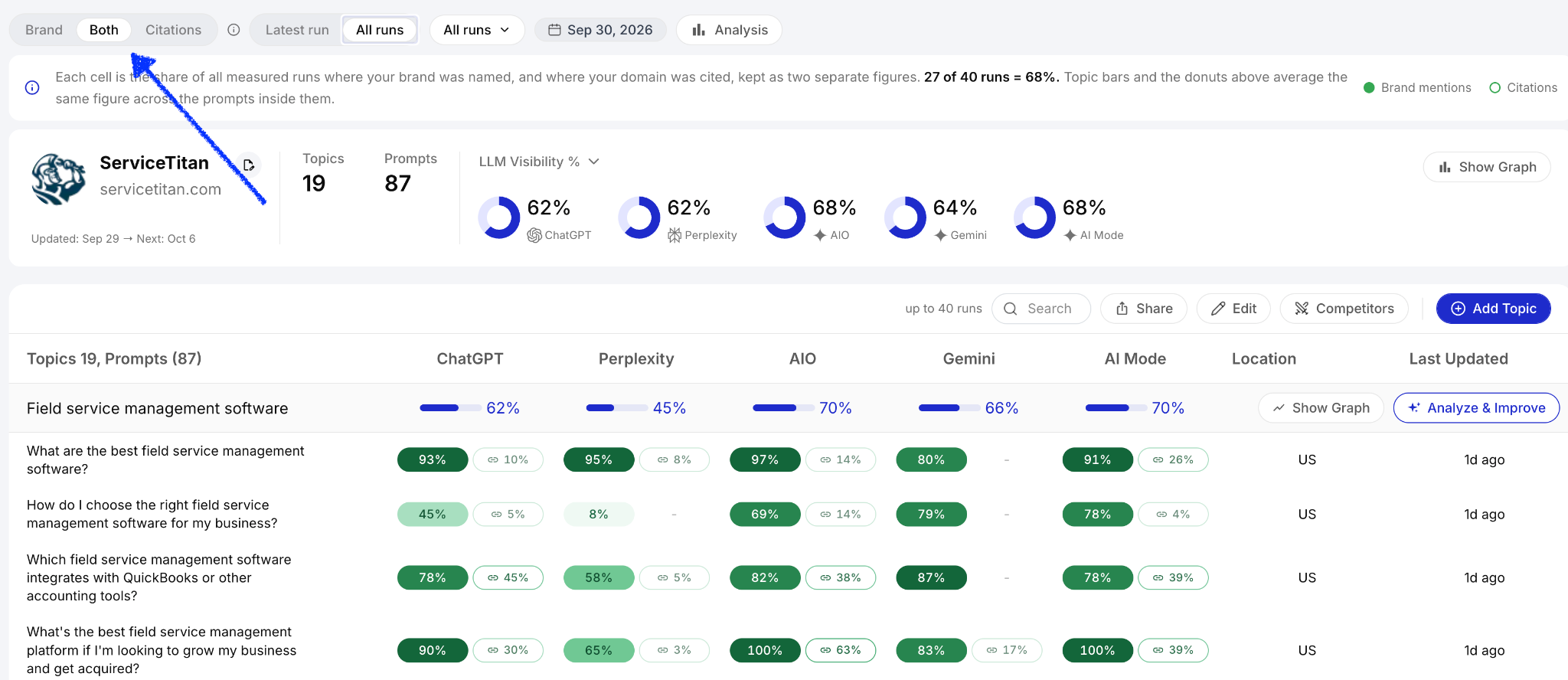
This is the core of the report. Organize it by topic, where a topic is a buying-intent area the client wants to be recommended for (for example, “call center quality assurance tools”), measured through several prompts that ask about that topic in different ways. For each topic, report the share of prompts in which the brand appears, separately for each model.
Two defaults make this section more accurate.
Show brand mentions on their own, because a mention is the model recommending the client by name and a citation is the model using a page as a source.
Lead with the topics that matter most commercially, instead of giving an average across every topic being tracked.
The difference can be large. The call center software company mentioned above had a brand-level visibility figure of 17% across everything that was being tracked for them. On their most important topic, call center quality assurance tools, ChatGPT mentioned the brand in 83% of prompts. A report that led with 17% (or a small brand-level increase from the previous month) would have hidden the strongest result of the engagement, averaging it together with newer topics where the client was only starting to build a presence.
Traqer reports topic-level visibility per model by default, with a Brand, Citations or Both toggle at the top of every page. If you report from a different tool, check that it lets you view mentions without citations, and each model on its own, before you build a client report on it.
The prompts within each topic should be bottom-of-funnel, high-intent queries. Informational prompts rarely produce brand recommendations for anyone, so they lower the numbers without telling the client anything about their position. Our help docs on prompts go into how to choose them.
3. Metrics that don’t move when you change what you track
Clients and executives usually want a simplified brand-level number to follow over time. We report two, alongside the per-model percentage, because neither can be moved by changing the set of prompts.
The first is LLM Visibility Count, the number of prompts in which the brand appears, per model. Because it is a count, adding new prompts cannot lower it. It rises only when the brand starts appearing somewhere it wasn’t before. The second is Topic Visibility, which counts how many topics have some visibility (the brand appears in at least one prompt) and how many have high visibility (the brand appears in more than half of prompts), across selected LLMs. It doesn’t fall when an ambitious new topic is added, and it doesn’t rise when a weak one gets removed.
In the monthly report, show both against the previous report date. Traqer’s date comparison shows how each model’s visibility moved between two update dates, which topics gained or lost ground, and which individual prompts gained or lost a mention or citation. The prompt-level detail is what lets you connect movement to specific work.
The per-model percentage still belongs in the report as a diagnostic, and many clients are used to seeing it. We include it with a short note that it falls when tracking expands.
Our visibility models documentation explains the three views in more detail.
4. Run history for the prompts that matter most
A monthly report built on the latest run alone will misstate visibility for most clients, in both directions.
Traqer re-runs every prompt weekly, so each month adds four or five runs to a prompt’s history. The most useful figure is how often the brand appeared across those runs and the ones before them.
We have seen both kinds of error in client accounts. For one salon and spa software client, the latest-run view showed very low visibility on a set of core prompts, while the full history of 27 weekly runs showed the brand being mentioned on many of them. In the same account, a prompt with a 5% mention rate looked like a case of occasional presence. The run pattern showed a single mention 21 runs earlier and none since, which is a different situation and calls for different work.
Here’s another example of a report on run patterns, which shows improvements in visibility over time:
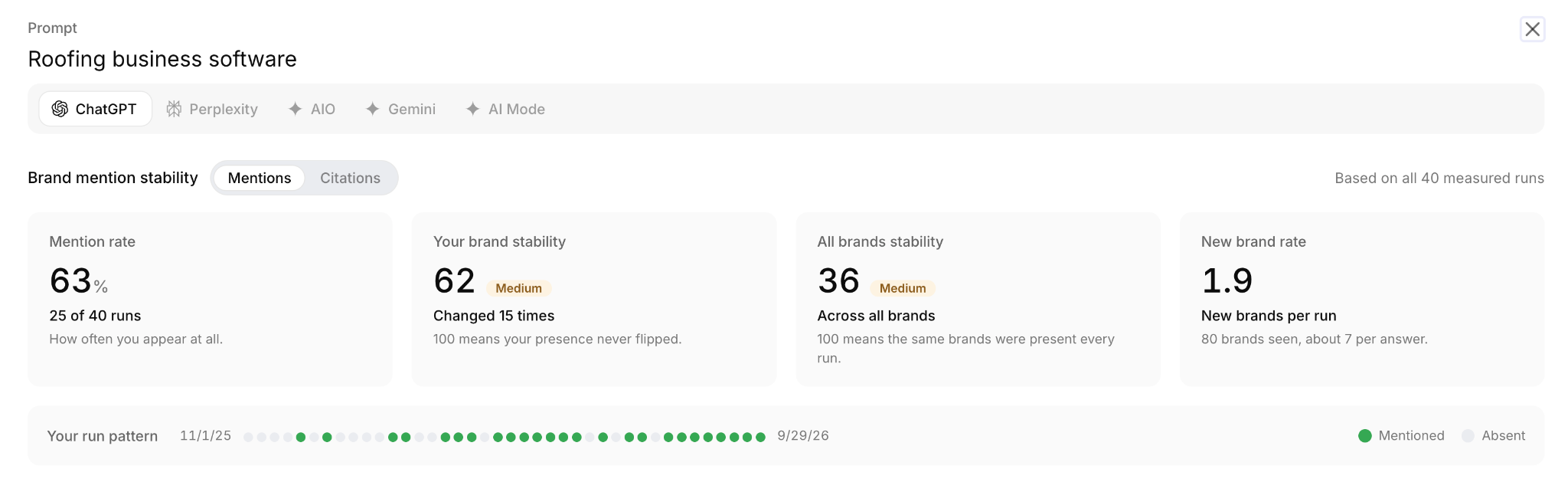
For this reason, Traqer’s help docs on All runs and brand mention stability recommend the All runs view for most client analysis and presentation.
For each priority prompt, the report can draw on the following.
Mention rate, the share of all runs in which the brand was named.
The run pattern, which shows whether the brand’s presence is stable, climbing or fading.
Brand stability, a score that measures how often the brand’s presence flipped between one run and the next.
All brands stability and new brand rate, which describe how much the whole answer changes from run to run and how often new brands enter it.
The last two are great for setting expectations.
Let’s use an example of a Gemini prompt asking for content marketing agency recommendations, where Grow and Convert was mentioned in 16 of 27 runs: a 59% mention rate. Across those runs Gemini named 61 different agencies, about nine in a typical answer, and the all brands stability score was 34. Two competitors appeared in 85% or more of runs. That combination means the brand is consistently among the small group Gemini recommends most for this prompt, and that the rest of the answer rotates heavily.
When a client has a long history of runs, it’s worth showing a recent window and the full history. The full history can miss recent improvement. For the call center software company, one prompt showed a 39% mention rate in ChatGPT across all runs, while actually the brand was mentioned consistently over the most recent five or six runs. That indicates a pattern of improvement that you can point to.
5. Competitive context
Clients usually want to know who is being recommended instead of them. Show tracked competitors’ topic-level visibility beside the client’s, per model, and list the prompts where a competitor is mentioned and the client isn’t. In Traqer, the competitor view on the brand overview does this per topic, and clicking a competitor shows exactly which prompts they appear in and on which models.
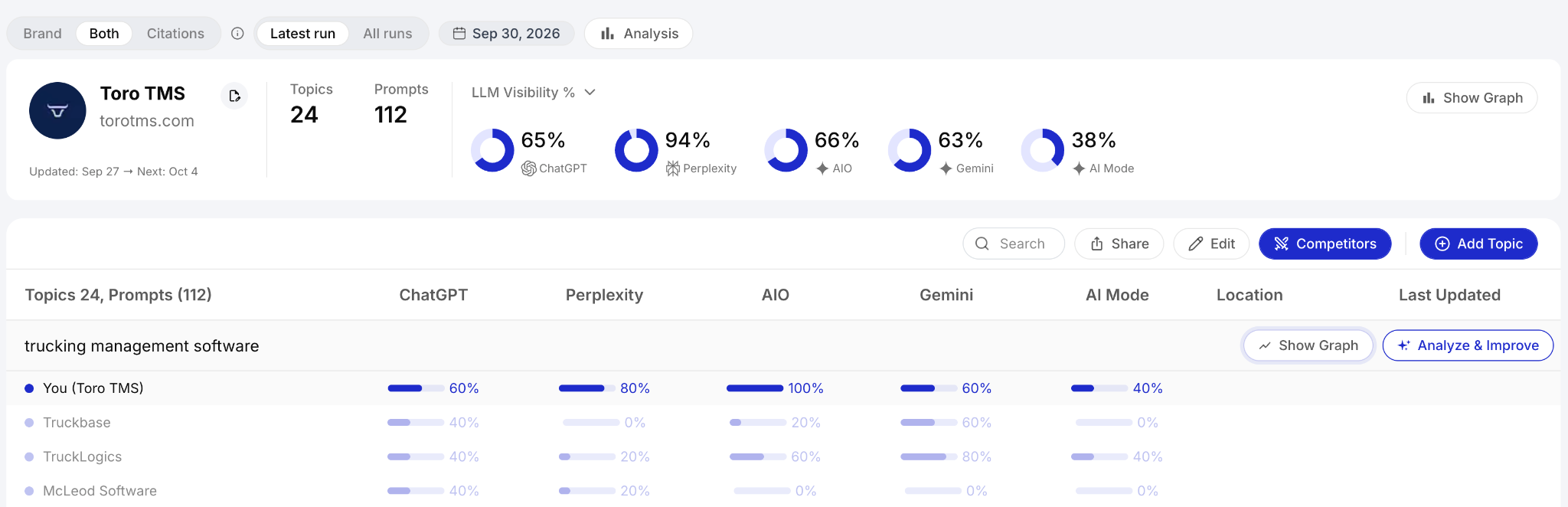
Keep the competitor set to the direct rivals the client benchmarks against. Many brands appear in AI answers occasionally, and including all of them makes the information hard to read.
Share of voice, the client’s portion of mentions relative to competitors across the same prompts, can be a useful single line for senior stakeholders because it describes market position.
It carries the same limits as any percentage, so read it per model and treat it as directional. Our overview of competitor tracking covers the brand-level and topic-level views.
6. Citations and source analysis
Report citations separately from mentions, and treat them as a supporting signal rather than a result to report as a win. A citation means one of the client’s pages was among the sources a model drew on to build its answer. Users rarely click those sources, so a citation is not a recommendation and does not carry the commercial value of a mention. What it tells you is whether the client's content is being picked up as source material, and which pages are worth targeting for outreach.
Citations are most useful for explaining (and then narrowing) the gap between being read and being recommended. On a newer topic for the call center software company, their domain was tied for the most-cited domain across all models, while the brand ranked around tenth for mentions. The LLMs were drawing on the client’s content without yet associating the brand with that category. The next step there was to get the client mentioned on the third-party pages already being cited for the topic.
The source list also supplies the outreach targets. Traqer’s Analyze & Improve view lists the domains cited most for each topic and the individual articles cited more than once, which are the pages the models return to repeatedly. In the report, include the top few, note which already mention the client, and flag those that list competitors but not the client. We go further into this in our guide to LLM citation tracking.
7. How the models describe the client (i.e., sentiment)
A brand mention only really helps the client if the description around it, and the information contained within it, matches how they want to be positioned. This is why it’s worth including a short excerpt of how the models describe the client on each priority topic, quoted from the full response text. Note where the description is inaccurate, out of date, or emphasizes something other than the client’s main strengths.
When the description is off, the cause is often to be found somewhere in the sources. If third-party pages describe the client in several inconsistent ways, the models’ descriptions tend to reflect that. The fixes belong in the plan at the end of the report, such as updating the client’s own pages and asking the publications that mention the client to correct how they describe it.
We treat sentiment as context for this section and keep it out of the headline metrics, because it is drawn from answers that vary from run to run. A single negative description is an event to investigate and correct. Our guide to AI brand monitoring covers this in more detail.
8. Business outcomes, measured from several angles
Attribution, as has been well-documented, is not as straightforward as it used to be. For this reason, we recommend reporting outcomes from a few different angles and look for trends across them.
For example:
AI referral traffic (from GA4’s AI Assistant channel)
Homepage and direct conversions across all channels, since recommended brands tend to receive their visits from searchers there
Branded search demand, from Search Console impressions for the brand name
Self-reported attribution, from “how did you find us?” fields on forms (this is actually one of the most useful signals right now)
Brand mentions on priority topics, taken from the earlier sections of the report
You’ll be hoping to show several of these signals moving in the right direction over a period of time.
9. Work completed and details of next month’s plan
Close the report with what was done during the month, mapped to the topics it was meant to affect, and what comes next. Each planned item should trace back to a finding earlier in the report. That might be a priority topic with low visibility and no page on the client’s site, a topic where the client is cited but not mentioned, or a frequently cited article that lists competitors but not the client.
Our default priorities follow the Prioritized GEO framework.
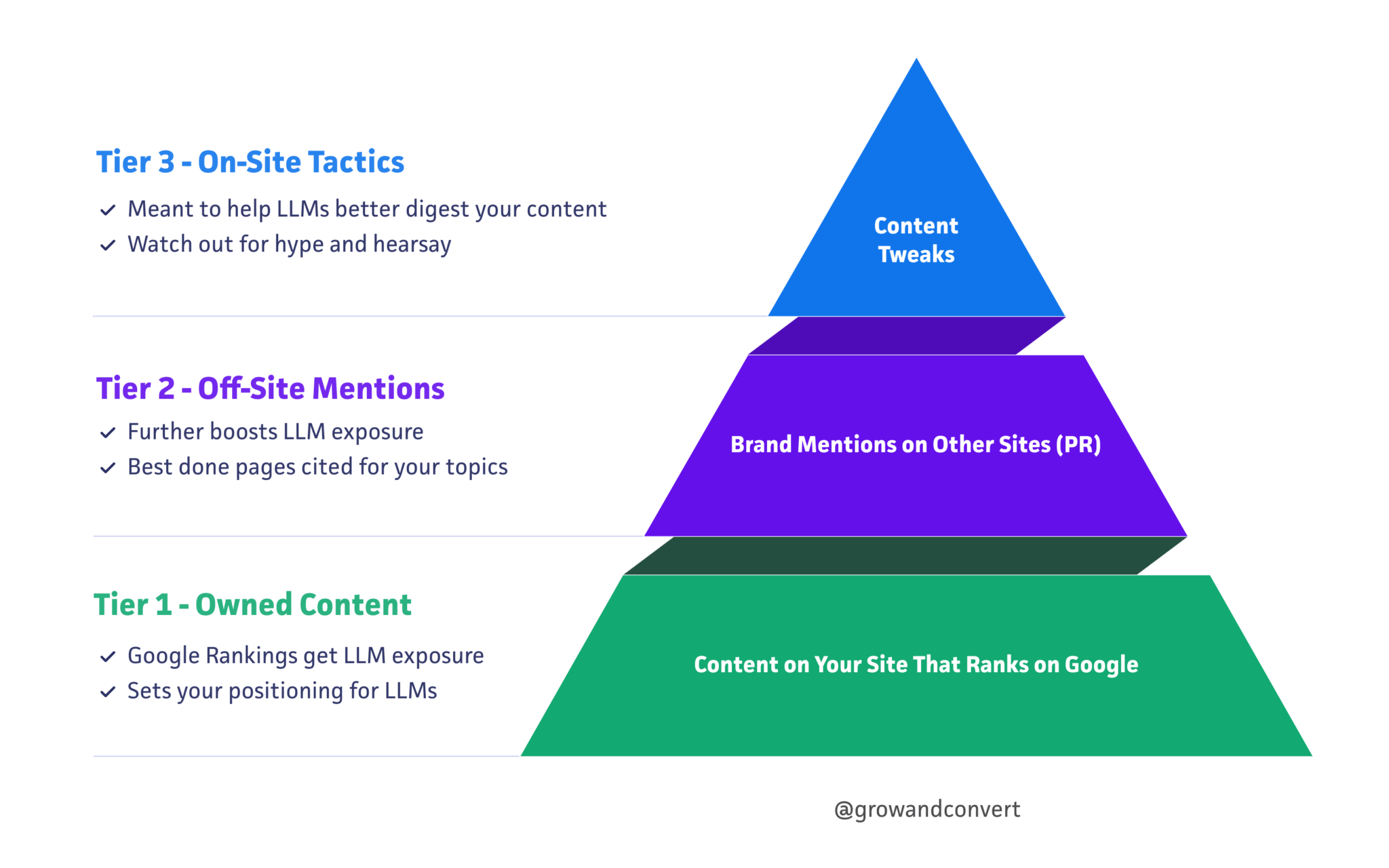
In this approach, owned content comes first, because a topic where the client has no detailed page of its own is unlikely to produce mentions. Mentions on the third-party pages the models already cite come second, and on-site technical changes come at the end. Our Redline Capital case study shows this order applied to a brand that started with almost no search presence.
Present the plan as the most likely route to improvement, given what the LLMs are recommending now. Neither ranking content nor a mention on a frequently-cited page guarantees that a model will recommend the client. A report that acknowledges this protects the relationship when a topic takes longer to move.
Monthly reporting on weekly data
Monthly is the right cadence for most client AI search visibility reports. Traqer runs every prompt once a week, so each monthly report draws on four or five new runs per prompt plus the history before them.
A month gives enough runs to see whether a change is holding, and it tends to match the pace at which content is published and mentions are earned. Weekly reporting prompts reactions to normal run-to-run variation, although a weekly internal check is useful while a specific piece of work is being tested.
The first month or two serve as a baseline, and the run history becomes more informative with each month that passes. It helps to explain at the onboarding stage that AI visibility is probabilistic. The client will likely see a different answer when they check a specific prompt from their own logged-in account, which is why the report relies heavily on topics and a longer run history.
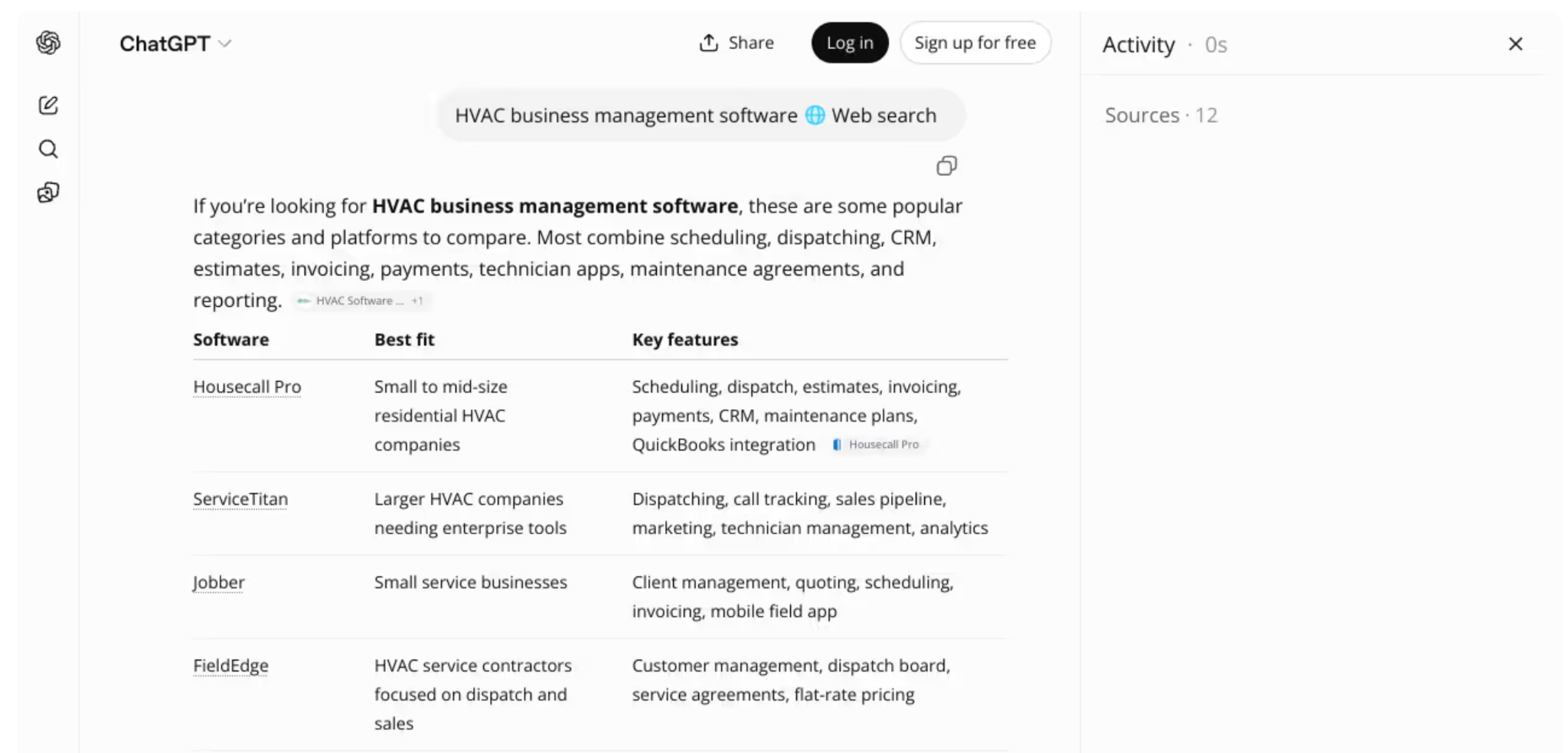
If a client’s own check disagrees with the report, the stored response usually helps your argument. Traqer captures each answer from a logged-out session in the model’s real web interface and keeps a screenshot of the response, so you can show exactly what a neutral user saw on that run. This is still a neutral user, without the client’s chat history or preferences (no tracking tool can reproduce that personalized context).
Once a quarter, step back from the monthly figures. Review whether the tracked topics still reflect the client’s commercial priorities, and add or retire topics as their business changes.
Getting the report in front of the client
In Traqer, clients can have a Viewer login that shows their data without letting them edit topics or prompts, and white label AI visibility reports can be presented under the agency’s brand. Every plan includes unlimited users and unlimited brands, so giving each client access does not change what the agency pays.
We cover agency workflows further in our guide to AI visibility tracking tools for agencies.
Building AI visibility reports in Traqer
Traqer was built around the report structure described here. It tracks topics rather than isolated prompts, reports each model separately, keeps brand mentions apart from citations, stores the full run history for every prompt, and supports white label reporting.
Every plan includes unlimited brands and users, so the cost doesn’t rise as you add clients.
You can start a free trial of Traqer here. No credit card required.