
Search around the topic of LLM tracking accuracy and you’ll probably find two camps. Tool vendors present their dashboards as if the numbers reproduce what buyers see, and skeptics argue that LLM tracking is guesswork because answers change on every run and are personalized to each user.
There’s an air of truth to both. Answers really do change from run to run, and they really are shaped by each user’s history, so no tracker can show you the exact answer any individual gets. But that still leaves plenty to measure, provided the tracker is designed around how these systems behave.
In this post, we’ll cover what LLM tracking can measure accurately, how we built Traqer around that, and the questions we’d put to any tracker, ours included, before trusting its numbers in a client report.
Why LLM tracking goes wrong
LLMs don’t behave like search rankings, and tracking them like keywords fails for two reasons.
First, the same prompt returns different brands from run to run. A brand can appear this week, drop out the next, and return the week after. Checking manually on a good day or a bad one gives a misleading read, and so does a tracker that reports one run of one prompt as a result.
Second, there’s no reliable record of what people type into LLMs, and models draw on each user’s history, saved preferences, and context, so two people asking the same question can get different recommendations. We cover this in detail in our post on invisible prompts.
Any method that treats a prompt like a keyword with a fixed ranking will produce numbers that look precise and mean little. The steps below are how to measure around both problems.
1. Track topics, not single prompts
Group related prompts into a topic: a buying-intent area, covered from several angles. In Traqer, each topic holds five prompts by default. The topic phrase itself (partly because Google AI Overviews users still type keyword-style queries), plus four natural-sounding questions that approach the topic from different directions. Visibility is then the share of a topic’s prompts in which the brand appears.
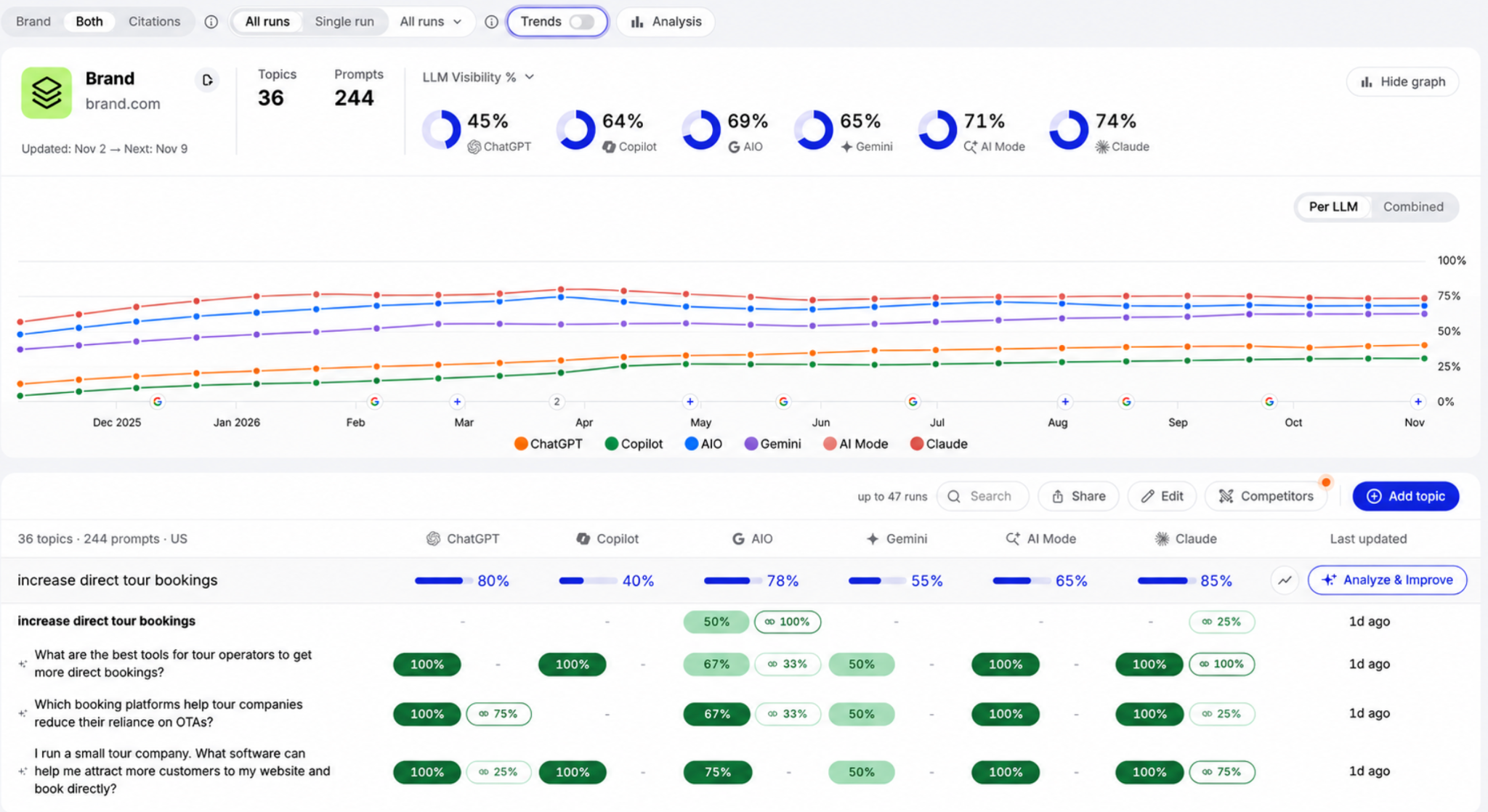
The question changes from whether a brand is visible for one prompt to how likely it is to appear when someone asks about the topic. That’s a probability, which matches how these systems work, and no single odd response moves it much.
There’s more on the mechanics on our topic-based tracking page, and the full reasoning in our guide to personalized GEO.
2. Only (or mostly) track prompts where brands get named
The prompts you track affect accuracy as much as the method does. Engines often answer informational questions without naming any brand, so tracking those meticulously adds noise.
Start with the bottom-of-funnel, product-centric prompts where the brand should clearly appear, and build out from there. Traqer suggests topics of this kind at setup and rates each prompt by how likely it is to produce brand recommendations, but you can treat suggestions from any tool as a starting point. Review and edit them against the questions your clients’ buyers actually ask.
3. Measure patterns across every run, not a single check
Because answers vary, one check of a prompt is a sample, and a weekly snapshot on its own isn’t much better. Accuracy comes partly from the history of runs, and the patterns you can see there.
Traqer re-runs every prompt every seven days and keeps each run, so for any prompt you can see the mention rate across all runs, a run-by-run dot pattern of when the brand appeared, and stability scores for the brand and for the answer as a whole. The help docs explain how each score is calculated.
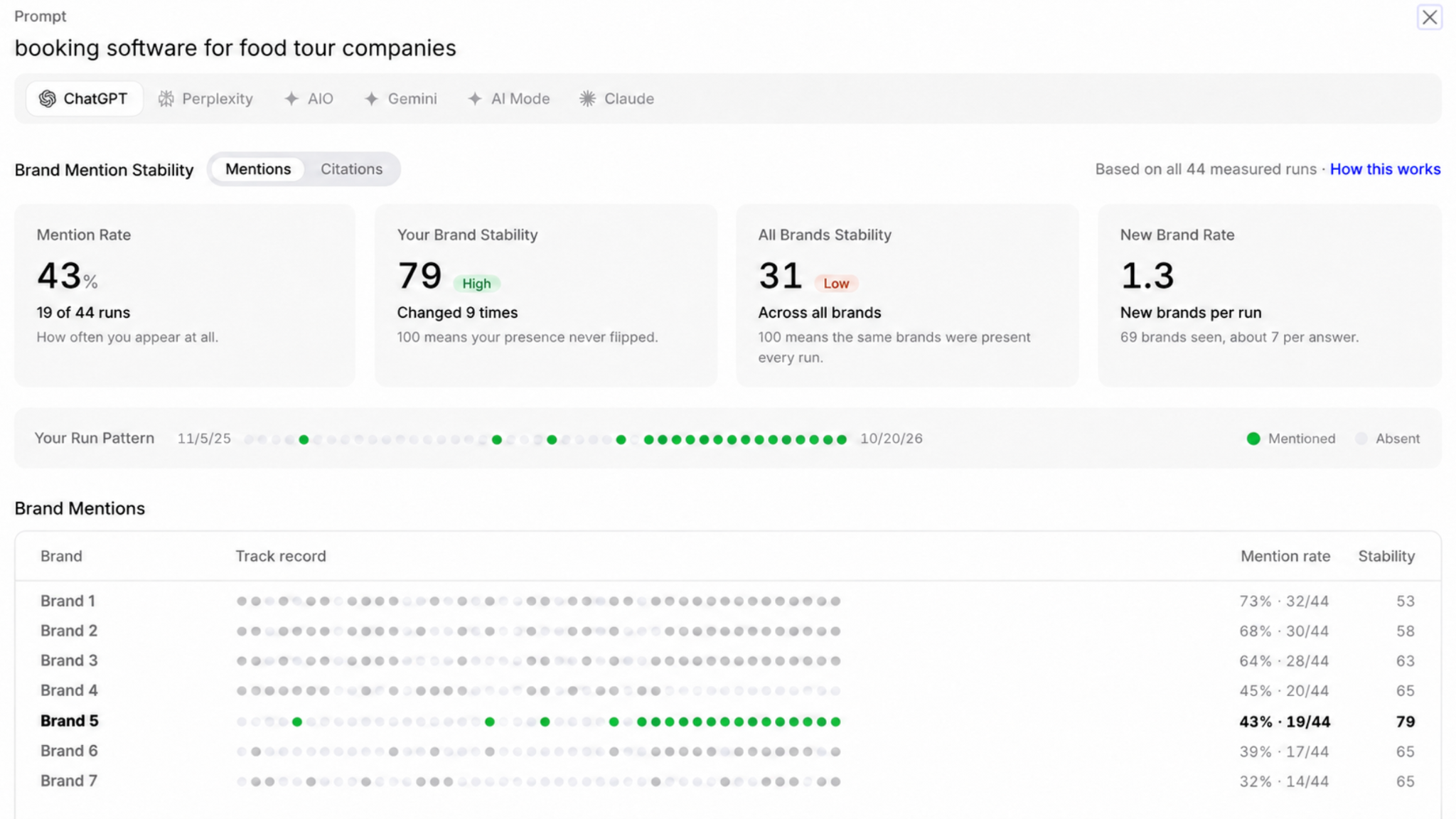
For example, let’s say two prompts each show a 60% mention rate. In one, the brand has appeared in every run for the past two months. In the other, it has appeared and disappeared intermittently. The percentage is identical, but the run pattern shows the difference (i.e., it shows that recent visibility is consistent).
The answer-level stability score tells you how much weight any single run can carry. When an LLM names a different set of brands on every run of a prompt, one absence means little, and so does one appearance.
Traqer’s Trends view applies the same caution: a prompt only gets a rising or falling arrow when its mention rate over the last five runs moves at least 50 points against the runs before, and only once it has 10 runs of history, because smaller swings are normal variation.
4. Read each LLM on its own
Engines behave differently. Citation habits, how many brands they list, and response styles all vary, so a brand can be consistently visible on one engine and rarely named on another. In our experience the spread between a brand’s strongest and weakest engine is often large enough that an average describes neither.
5. Keep brand mentions separate from citations
A mention means the engine named the brand in its answer. A citation means a page was used as a source. People tend to read the brand names in an answer and rarely click the sources, so mentions are the commercial measure. Citations matter as a foundation and as a list of outreach targets, but they’re a separate signal, and neither is evidence of the other.
Combining them into one figure overstates how often a brand is actually being recommended. Traqer keeps the two apart with a toggle on every page, and we’d recommend reporting on mentions.
Our guide to how to track brand mentions in AI search covers the distinction in more detail.
6. Use headline metrics that can’t be gamed
A single brand-level visibility percentage falls when you add topics you aren’t yet visible for, even though nothing about the brand’s real visibility changed. It also rises if you quietly delete the prompts you keep losing. Either way, the metric can move without anything real happening, which makes it a poor headline.
Pair the percentage with measures that only move on real change. Traqer reports LLM Visibility Count, the number of prompts where a brand appears, and Topic Visibility, which groups topics by how often the brand appears in them. Both only rise when visibility is actually gained.
We cover how to read all three in our guide to AI visibility metrics.
7. Check the numbers against the real answers
A visibility figure you can’t trace to an actual answer is a figure you can’t defend. Whatever tool you use, you should be able to open the response behind any data point and see what the engine actually said.
In Traqer, prompts for ChatGPT, Copilot, Gemini, Google AI Overviews, and Google AI Mode run through logged-out sessions in each engine’s own web interface, and every response is stored with a screenshot, the full text with the brand highlighted, the ranked list of brands named, and the cited URLs. Claude can’t be captured through a logged-out session, so it runs through the API.
What even accurate tracking can’t tell you
A neutral, logged-out session doesn’t carry the history and preferences a real user brings. Tracking shows how a brand appears to a buyer with no prior context, which we think is the closest available view of what a real buyer sees, and it can’t show how the brand appears to any one individual.
Two practical limits are important to mention here. Data starts on the day a prompt is added and can’t be backfilled, and Traqer refreshes weekly, so it suits strategic monitoring rather than real-time alerts or very high-volume tracking. And what improves visibility is less certain than the measurement: owned content that ranks, and mentions on pages engines already cite, can influence what engines draw on without controlling what they say. Our approach is set out in Prioritized GEO, and we treat it as a set of evidence-backed hypotheses, none of which is guaranteed to work.
Putting the numbers in a client report
For example, let’s say a client types one of their tracked prompts into ChatGPT, doesn’t see themselves, and sends you a screenshot. The run pattern and stability scores give you a grounded answer: visibility is probabilistic, here’s how often the brand has appeared across every run, and here’s how much that engine changes its answer on this prompt anyway. The same data stops you taking credit for a one-off appearance.
Report a rate across a topic and a pattern across runs, per engine, with the limits above stated alongside it. Because the headline counts don’t fall when tracking expands, a client’s scope can grow without the report working against it. We cover the reporting side in our guide to building an AI visibility report, and how agencies run this across a roster in our piece on AI visibility tracking tools for agencies.
Checking a visibility tracker against these steps
Whichever tool you use for AI visibility tracking, the steps above translate into questions that tell you how much weight its numbers can carry.
Does it report results per topic, or per single prompt?
Is each engine reported on its own, or blended into one figure?
Can you open the individual runs and the answers behind a number?
Are mentions and citations reported separately?
What happens to the headline metric when you add new prompts, or delete losing ones?
How are the prompts chosen, and can you edit them?
Which LLMs are captured from real web sessions, and which come from an API?
Traqer has a 14-day free trial, no credit card required.