Sentiment Analysis
How LLMs describe a brand, what they praise and what they criticize, per LLM and over time.
Sentiment Analysis shows how LLMs talk about a brand. Traqer reads every answer that mentions the brand and sorts what the LLMs say into three groups:
Described As
Positive Sentiment
Negative Sentiment
You can get to sentiment analysis in two places. Click Analysis at the top of the brand overview page to see it across all topics, or open Analyze & Improve on any topic to see it for just that topic.
Why there is no single sentiment score
Many AI visibility tools report sentiment as one number, for example 72% positive. We don't, because a number like that gives you nothing to act on. If a client's sentiment is 45%, what do you do with that?
Instead, what's useful is knowing what LLMs actually say about the brand: what they call it, what they recommend it for, and what they criticize. Those are the three tables.
Described As
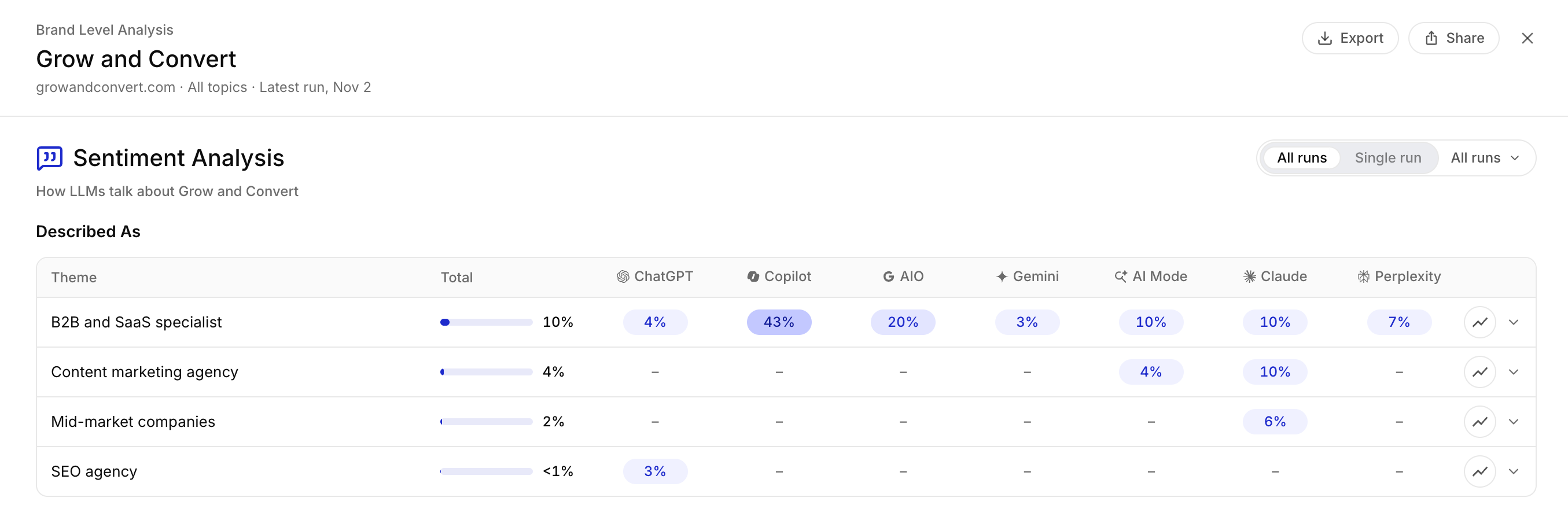 This table shows how LLMs position the brand: the category they put it in and the kind of customer they recommend it for. In the example above, LLMs describe Grow and Convert as a B2B and SaaS specialist, a content marketing agency, an agency for mid-market companies and an SEO agency.
This is one of the most important parts of sentiment analysis, even though we don't see many in the industry talking about it. Real users rarely ask an LLM for a short general phrase like "the best accounting software". They have a personalized conversation about their own business and, along the way, ask which product is right for them. Whether an LLM recommends a client's product to that person depends on whether it has seen the brand described as a fit for that situation. (More on this: Personalized GEO.)
For example, if a client sells accounting software and wants to win dental practices, track a topic like "accounting software for dental practices" to measure visibility. Then check Described As to see whether any LLM actually calls the product a fit for dental practices. If you see instances of the brand being described as accounting software for dental practices, that's a great example of your work likely influencing the LLMs directly.
Positive Sentiment and Negative Sentiment
Positive Sentiment lists the reasons LLMs give for choosing the brand, such as its methods, strengths, results and favorable comparisons with competitors.
Negative Sentiment lists anything that could hurt the brand, such as weaknesses, doubts about its credibility, or advice to choose a competitor instead. Most brands have few negative themes. When an LLM has a poor view of a brand, it usually leaves the brand out of its answer instead of criticizing it. Negative themes are added from fewer mentions than positive ones, so you see criticism early.
How Traqer finds themes and computes percentages
Traqer uses AI to scan every single mention of a brand and find themes in the responses. A theme needs to come up in several answers to be included, and fewer for negative themes. Once Traqer finds a theme, it keeps tracking each one on every run after that. A theme that did not come up in the latest run stays in the table with the label "Not in the latest run" and the date it was last seen.
Each row is a theme. Total is the percentage of answers mentioning the brand that make this claim, across all LLMs, and each LLM column shows the same percentage for that LLM.
For each theme and LLM, Traqer divides the number of answers that mention the brand and make that claim by the number of answers that mention the brand. If an LLM mentioned a brand in 20 answers and 5 of them describe it as a B2B and SaaS specialist, that theme shows 25% for that LLM. Answers that don't mention the brand are not counted, so these percentages describe how LLMs talk about the brand when they mention it, separately from how often they mention it.
All runs combines several runs and Single run shows one. As on the brand overview page, we recommend All runs for analyzing a client's brand and reporting to clients, because a single run is a noisy sample (see All Runs and Brand Mention Stability).
Trends and excerpts
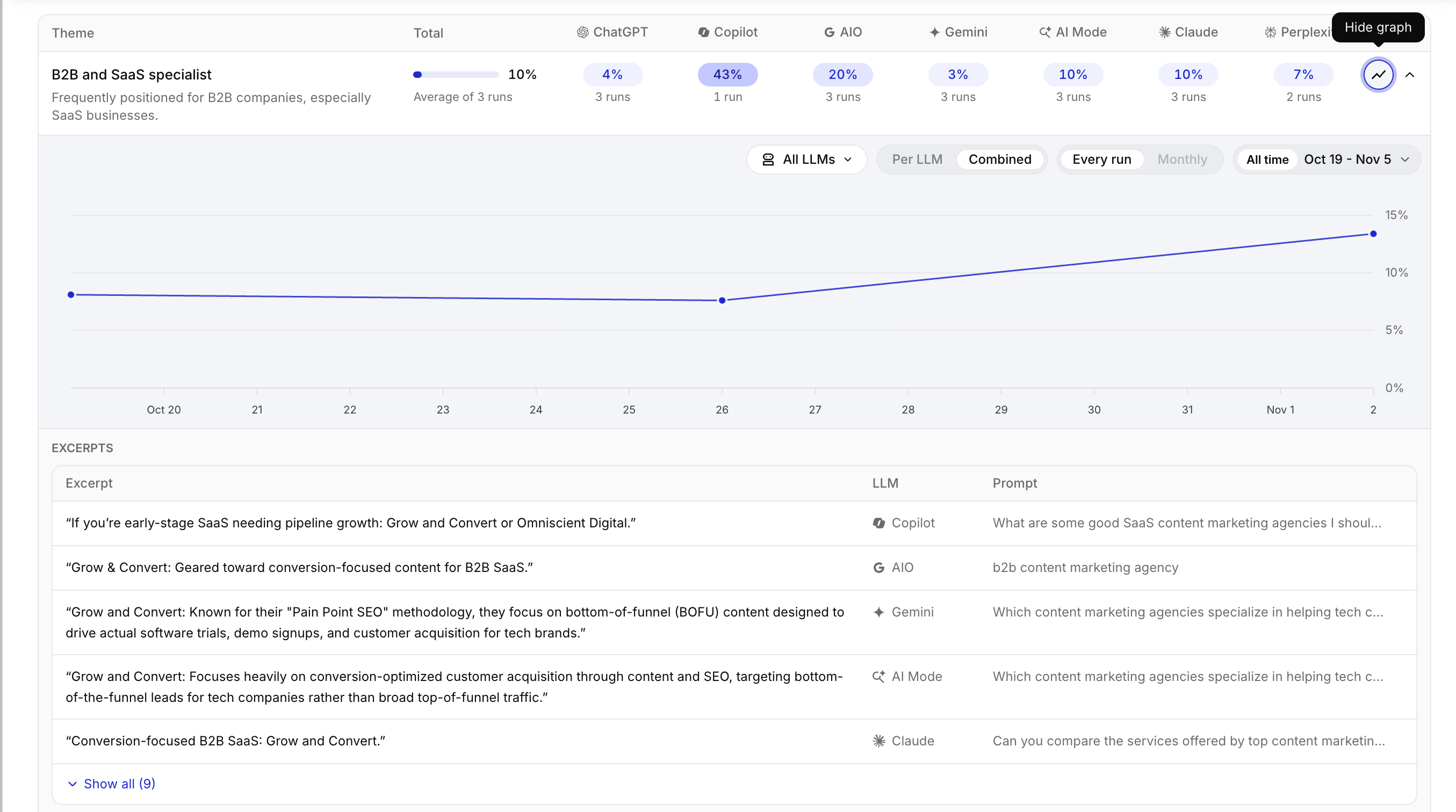
The graph icon on each row shows how often LLMs made that claim over time. Use it to show a client that a positioning their content targets is appearing more often.
The arrow opens the theme's description, the number of runs behind each percentage, and the excerpts behind the theme. Each excerpt shows the LLM and the prompt, and opens the full response without leaving the page. This is the quickest way to check what a theme means, for example what LLMs actually said when they called Grow and Convert a B2B and SaaS specialist.
All Mentions
Below the three tables, All Mentions lists every passage in which an LLM mentioned the brand in the latest run, grouped by topic and then by LLM.
In our experience, clients love to see this and reading through them regularly gives you an extremely valuable pulse on what LLMs are saying about your brand. The percentages described above are great for quantifying trends and patterns, but literally reading what LLMs actually say about a client often shows things the numbers don't.
Reading these and going over them with clients is useful!