Trends
See which prompts are rising or falling for a brand, based on its last 5 runs compared with the runs before them.
The data in each topic of a brand overview page tells you how you're doing visibility-wise for each topic, and graphs and the brand stability dot graph tell you how things are trending.
But another feature we have (suggested by a user and loved by us!) to easily see if visibility for a given prompt for a given LLM is trending up or down is the Trends toggle.
 Toggling it on adds arrows that show which prompts are rising or falling, so you can spot changes without opening every prompt.
 Trends works with All runs and Last 12 runs. Last 4 runs and Last 6 runs are too short to compare, so trends are hidden there.
How Traqer decides a prompt is rising or falling
For each prompt on each LLM, Traqer compares the brand's last 5 runs with every run before them. If the mention rate moved by 50 points or more, the cell gets an arrow: green for rising, red for falling. Smaller changes are normal run-to-run variation, so they don't get an arrow.
For example, a brand mentioned in 16 of 17 earlier runs (94%) and then in only 1 of the last 5 (20%) still shows a healthy 77% in All runs. The red arrow tells you the LLM has mostly stopped mentioning it.
A prompt needs at least 10 runs before it can show a trend, so new prompts aren't flagged too early.
Reading the arrows
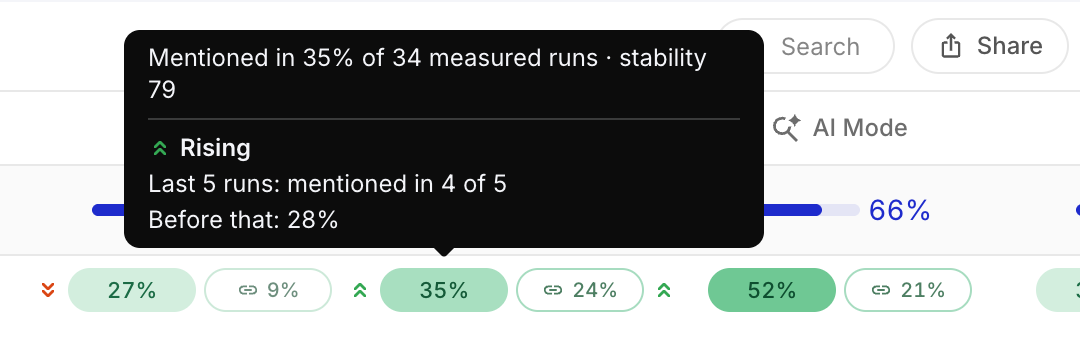
An arrow to the left of a cell applies to the brand mention, and an arrow to the right applies to the citation. Trends follow the Brand, Both and Citations toggle at the top of the page.
Hover over a cell to see the details. In the example below, the brand was mentioned in 4 of the last 5 runs, compared with 28% of the runs before that.
Filtering to rising or falling prompts
Above the topic table, Traqer counts the prompts that are moving, for example 16 falling and 19 rising. Click either one to show only those prompts. A prompt counts if any LLM shows it moving that way, so the same prompt can appear in both.
This is a quick way to find wins to show a client, and to see which prompts to look into before a client call.
Trends are only shown to your team. Anyone viewing a share link sees the regular All runs view.