Many AI brand sentiment analysis tools give you a sentiment score, which classifies the tone of each answer that mentions a brand and rolls the results into a single number you can chart over time. On its own, that number tends to move within a narrow band, because a model that recommends a brand rarely does it in hostile language. Peec’s documentation, for example, notes that most of its sentiment scores fall between 65 and 85. A score like that can tell you the tone is broadly positive, but it can’t tell you how you’re being described, including the category the models put you in and the caveats they attach to a recommendation. That’s why the more useful tools now pair the score with the specific attributes and themes behind it.
We track AI visibility for dozens of client brands at Grow and Convert, and we built Traqer to do it. In our experience, the parts of LLM brand sentiment monitoring that lead to useful work are the characterizations and the exact wording behind them, read engine by engine. A score can summarize those just fine, but on its own it leaves out most of what you’d act on.
(A note on terms used here: “LLM sentiment analysis” is also for something else; using language models to classify the sentiment of reviews, social posts or support tickets. This article is about monitoring what the LLMs themselves say about a brand.)
In this article we cover:
What LLM brand sentiment monitoring measures
What to look for in an AI brand sentiment analysis tool
An example from our own brand’s data
How the main tools compare
What changes how the models describe a client
What LLM brand sentiment monitoring measures
When a model recommends a brand, it usually explains why in a sentence or two. In effect, the model acts as the brand’s first salesperson. A buyer reads it before they visit the site or speak to anyone, and the model can only write it from what it has understood about the brand. Sentiment monitoring looks at those descriptions. A few properties of the data are worth knowing before you choose a tool or report on it.
Only answers that name the brand are in scope. Sentiment is calculated using brand mentions, so it depends on visibility. For a brand with low visibility, the first job is usually to get named more often, and sentiment becomes more informative as mentions across LLMs grow.
Answers change from run to run. The same prompt on the same LLM can name a brand one week and leave it out the next, and the wording around a mention varies too. No single answer is the client’s reputation. What’s worth reporting is a pattern across many prompts and runs, which we cover in more depth in AI search visibility metrics.
Engines work differently. Google AI Overviews and AI Mode tend to summarize search results, while ChatGPT can lean more heavily on training data (though it also searches the web), so the same brand will be described differently on each. A blended sentiment score would hide this.
Tracking uses neutral sessions. Trackers, ours included, run prompts in logged-out sessions with no user history. Real buyers have long, personalized conversations that no tool can reproduce, which we explain in invisible prompts. A logged-out answer is the closest available view of what a buyer sees, and it’s best treated that way.
What to look for in an AI brand sentiment analysis tool
These are some of the things we’d recommend looking out for when you’re testing different tools.
Specific characterizations. Look for the themes the models repeat (“known for conversion-focused content”, “expensive for small teams”) and the category labels they use. A “tone score” alone can’t tell you whether the positioning a client wants is the positioning the models describe.
Results per engine. A client can be framed one way on ChatGPT and another on Gemini. If the tool only reports a combined figure, you can’t tell which engine needs attention.
The exact sentences. You want the quote behind every theme, the prompt that produced it, and a link to the full answer, ideally captured from the real interface. That record is what goes into a client report, and it settles any “that’s not what I saw” conversation.
The counts behind the percentages. A theme at 50% of mentions means something different when the base is four answers rather than forty. The tool should show the base.
A way to see the sources. When a description is off, the next question is where the model got it. A tool that shows which pages the engines cite for a topic lets you trace a framing back to the coverage that feeds it.
Agency/multi-brand fit. Pricing shouldn’t climb with every brand you add, and stakeholders should be able to log in. Exports that drop into a deck save time at reporting.
An example: how the engines describe Grow and Convert
Here’s what a sentiment report looks like in practice, using our own agency, Grow and Convert. The data comes from Traqer’s Sentiment Analysis for Grow and Convert, and covers 67 answers that named the agency across 12 topics and 56 prompts.
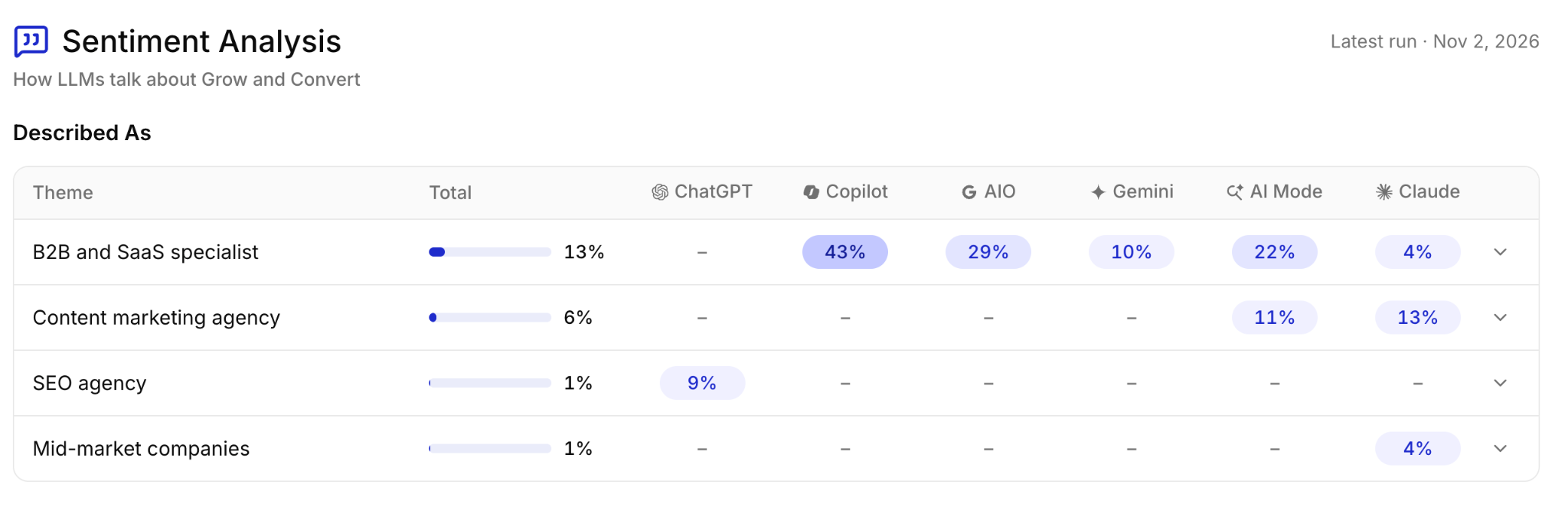
The Described As group showed how the engines categorize us. The most common label was “B2B and SaaS specialist” (13% of answers), followed by “content marketing agency” (6%). On AI Mode, one answer described us as “a content agency strictly focused on conversion-oriented growth for B2B SaaS.”
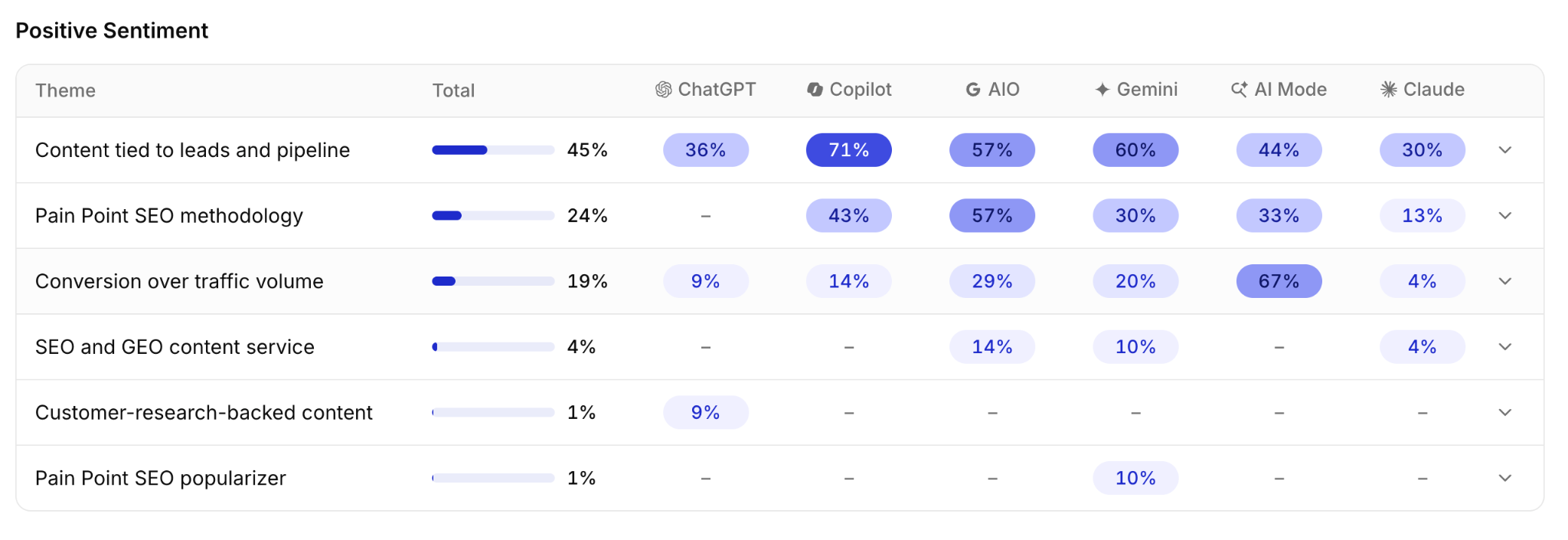
The positive themes were led by “content tied to leads and pipeline”, present in 45% of answers, then “Pain Point SEO methodology” (24%) and “conversion over traffic volume” (19%). ChatGPT summed us up in one answer as “Conversion-focused content partner.”
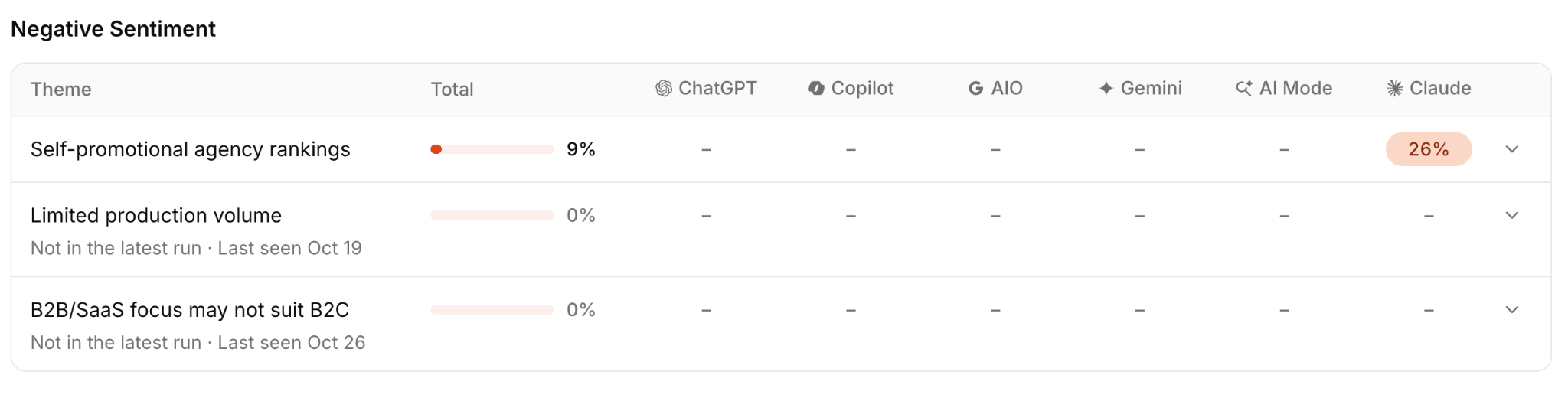
The negative themes were led by “self-promotional agency rankings”, at 9%. It came from answers like Claude’s observation that most “best of” lists come from agencies that rank themselves, with Grow and Convert among the examples it named.
We’d look at it the way we’d read a client’s brand sentiment:
The core positioning comes through successfully. Leads over traffic is the argument we’ve published for years, and it appears in nearly half the answers that name us. If a client’s main differentiator showed up in 5% of answers instead, that would be the first thing to work on.
The quotes carry detail. One Copilot answer, filed under the positive Pain Point SEO theme, said we focus on bottom-funnel leads “but less on brand authority.” It’s a fair summary of our approach, but it’s also a qualifier a prospect will read, and you’d only see it by opening the excerpts.
A negative theme is a prompt to investigate. We publish list posts that include ourselves, partly because a model can only describe a brand in detail if it has read that detail somewhere.About one in ten of the answers that named us made that point. For a client, we’d note it and check whether it persists over the following runs before deciding whether it’s worth acting on.
How the main AI brand sentiment analysis tools compare
Each of the main AI visibility trackers below includes some form of brand sentiment functionality. The differences tend to be in what they report and how they report it.
Traqer
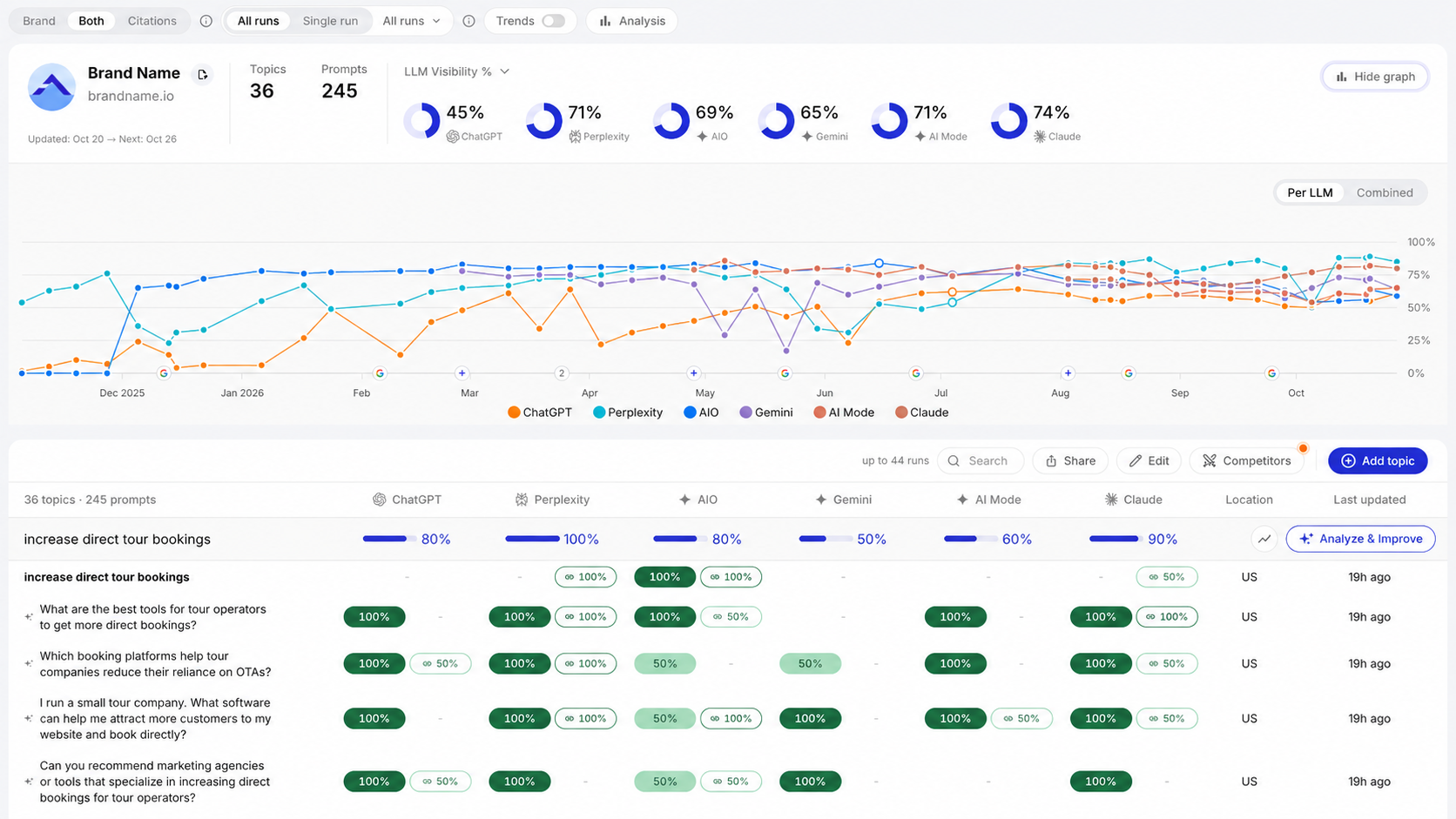
Traqer is the AI visibility tracker we built at Grow and Convert for tracking many client brands at once. Its Sentiment Analysis reads every answer that names a brand and groups what the engines say into themes, for the whole brand or for a single topic. It has three parts, as we outlined above in the example:
Described As shows the categories and labels the engines attach to the brand. It’s the quickest way to see whether a client is being placed in the category they’re trying to win, and whether that placement differs between engines.
Positive and negative themes list what recurs with a short description. Every theme shows the share of answers that express it on each engine, plus a total, with the raw counts underneath so you can see how many answers each percentage rests on. The total pools the counts rather than averaging the percentages, so an engine that names the client more often carries more weight. Open a theme and you see each excerpt, with the engine and the prompt it came from.
All Mentions collects every sentence in which an LLM named the brand, organized by topic and engine. Each one links to the full response, and responses come from real, logged-out sessions on the engines that offer them, with a screenshot stored for each. Exports include these quotes on their own tab, ready for a client deck.
The rest of the product supports the brand sentiment insights:
Topic-based tracking methodology, because a brand is often described differently depending who the buyer is and what they ask. Prompts are grouped into topics, such as a product line or a use case. Each topic is tracked through several variations of the same question, because buyers phrase things in different ways and a single prompt’s answer can change from one run to the next. Results are then reported for the topic as a whole, which gives a steadier reading than any one prompt can.
Mentions and citations are tracked separately, with a toggle on every page, so you can tell whether a client is being recommended or only used as a source. There’s more on that distinction in our guide to LLM citation tracking.
Analyze & Improve, a per-topic view, shows the domains and articles the engines cite most often. When a theme looks wrong, these are the pages to read first, and they double as an outreach list.
Stability data shows every run of every prompt, with a mention rate and a run-by-run pattern, so you can tell whether a client’s presence on a prompt is steady or occasional.
LLM coverage includes ChatGPT, Copilot, Gemini, Google AI Overviews and AI Mode on every plan, with Claude and Perplexity as per-prompt add-ons.
Agency features include unlimited brands and users on every plan, Viewer logins so clients can see their own data without editing it, white-label reports on the Plus and Pro plans, and an MCP server that lets an AI assistant ask questions such as “how do ChatGPT and Gemini describe this client compared with its main competitor?”
Plans start at $25 a month, and every paid plan includes Sentiment Analysis on every brand you track, so you can see how the engines describe your company/client and its competitors from the first weekly run.
Profound
Profound’s Sentiment feature, which its documentation lists as available on all plans, runs on dedicated sentiment prompts that ask the engines to evaluate a brand directly, such as “What are the pros and cons of [brand]?” It gives an overall sentiment score and groups the claims in AI answers into themes such as pricing or customer support, with positive and negative attributes under each, and a count and trend direction for every theme. It surfaces the exact text behind each signal and attributes sentiment to the specific cited pages driving it, including a table of the most-cited pages containing negative claims. It also compares themes against competitors, by platform and topic, and tracks sentiment daily. Sentiment prompts count toward the account’s prompt allowance, which is worth planning for when sizing a client’s tracking.
Peec
Peec has two relevant features. Its sentiment metric scores the tone of a brand’s mentions from 0 to 100, and its prompt view highlights whether each mention reads as positive, negative or neutral. Its newer Brand Perception product goes further. It lists the attributes the models associate with a brand, each scored for how strongly the models link it to the brand and for where the brand places against competitors on it. It also lists the objections the models raise against a brand, and checks the claims they make against facts you supply, marking each as supported, contradicted or inconclusive, with the sources behind each one. Some of these views run their own question sets rather than only reading the prompts you track.
Otterly
Otterly’s headline sentiment metric is a Net Sentiment Score from −100 to +100, tracked over time alongside brand coverage and position, for the brand and every competitor in the tracking set. At prompt level you can open individual answers to see the attributes driving the score. Its help documentation advises reading the score alongside the count of sentiment signals behind it, because the same score means much less when it rests on ten mentions than on five hundred. We’d give the same advice for any tool. A separate Brand Profiling tab lists the attributes the engines associate with a brand, each with a strength score, along with the objections they raise. It compares both against competitors, links every attribute to the answer and sources it came from, and can be filtered by country, tag and engine.
Questions to put to any vendor
Does sentiment show the themes and exact sentences, or a score only?
Is it broken out per engine, and can I see the number of answers behind each figure?
Is sentiment read from my existing tracked prompts, or does it need separate prompts that count against my allowance?
Can I trace a theme to the pages the engines cite for it?
How does the price change as I add clients, and can each client have its own login?
What changes how the LLMs describe a brand?
Sentiment monitoring tells you how a client is described. The work that changes it is content and PR, and as with visibility, you influence what the models read rather than control what they say.
The brand’s own pages come first. Models often repeat a brand’s positioning in close to its own words.
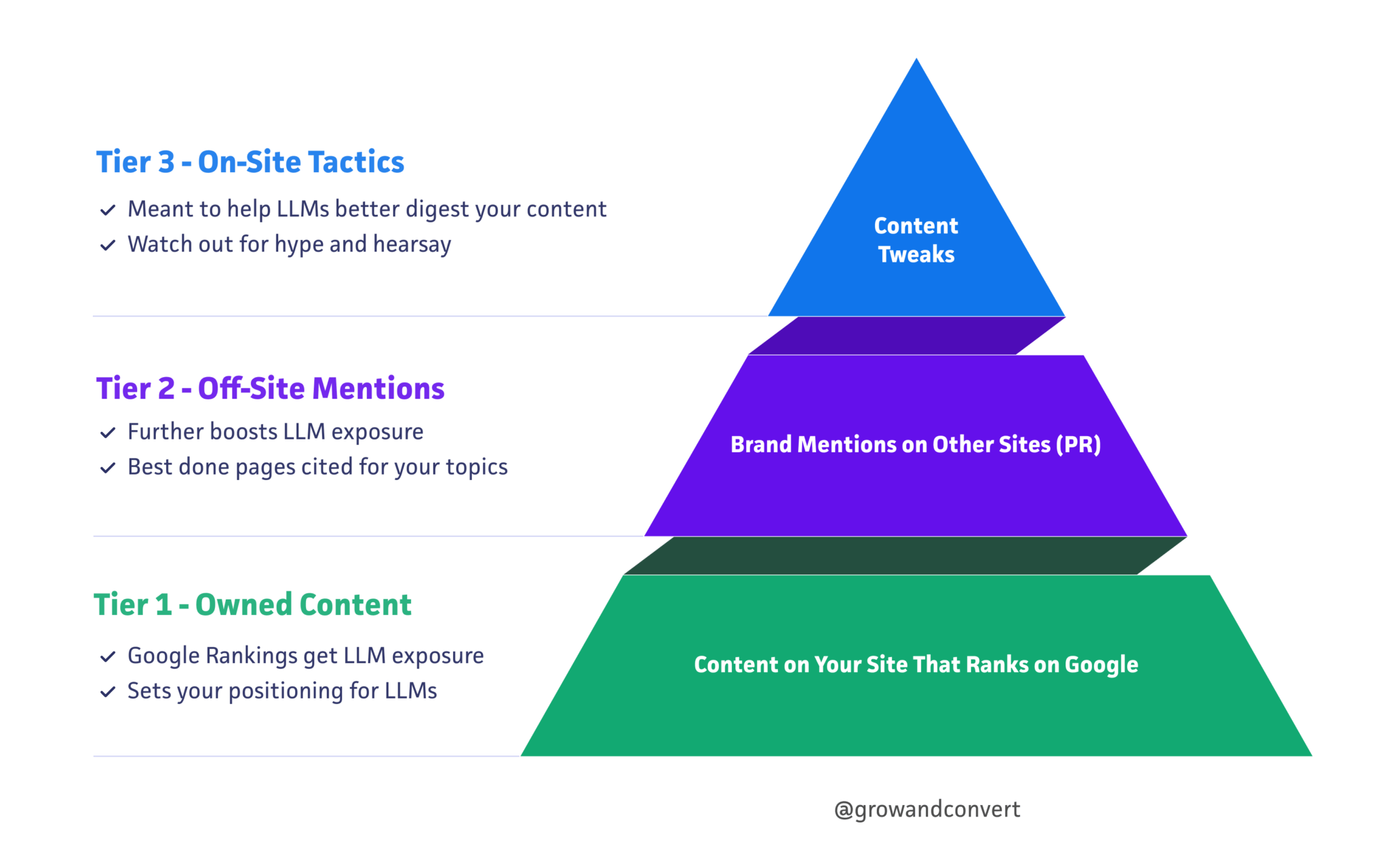
For Constitution Lending, Grow and Convert wrote its core differentiators into every article, such as lending up to 80% of a property’s value and closing loans in as little as four days. ChatGPT’s recommendations repeat those same points. If a client’s strengths aren’t stated plainly and specifically on its own site, the LLMs won’t have much to work with. With this in mind, owned content is the foundation of our Prioritized GEO framework, and our guide to Personalized GEO covers how to work out the use cases and situations a client wants to be described for.
Then the framing in the sources the models cite. If an engine keeps citing a roundup or review page that describes the client inaccurately or out of date, it’s worth asking the publisher to correct or update it. The client’s description should also be consistent across the publications that mention it. For agencies running earned media, our piece on the best AI visibility tool for PR agencies covers this in more detail.
Investigate a negative theme before reacting to it. Open the quotes, check the prompts and look at what the engines cited. Sometimes the cause is a single outdated page. Sometimes it reflects a real product issue, and content won’t necessarily change that. Either way, a theme that shows up in a handful of answers in one check is worth watching across the next few runs before it goes into a client report as a problem.
On-site tactics such as FAQ blocks, llms.txt files or schema haven’t shown a measurable effect in our client work, so we wouldn’t expect them to change how a client is described. More on the content side is in how to optimize content for LLMs. For reporting sentiment alongside visibility, our guide to the AI visibility report shows where it fits in a monthly client update.
Traqer is built for agencies, consultants, and companies tracking AI visibility for several brands at once. You can see how each engine describes each client and trace every description back to the answers and sources behind it. Start a free trial. No credit card required.