Guides on tracking AI visibility are almost always written for one brand: choose your prompts, run them across the engines, and watch how the answers change over time. That’s reasonable advice as far as it goes.
The multiple-brands version of the question mostly gets answered by a line on a pricing page, “supports multiple brands,” which tells you simply that a tool can hold several brands. It doesn’t tell you what each brand should track, or how to read the results. If you’re responsible for six or twelve brands, because you run an agency roster, a house of brands, or a portfolio, that’s the part you actually need.
We track dozens of brands on a single account at our agency, Grow and Convert, using Traqer, which we built because the tools we tried didn’t measure visibility the way we think it should be measured, and the cost didn’t work at that brand count.
In this guide, we’ll show you how we’d set up tracking for multiple brands, step by step, and what it costs.
How to approach multiple brand tracking for LLM visibility
Put every brand on one account, rather than having one approach for each. The failure we see most often is about fragmentation: e.g., one brand tracked in a tool, two checked by hand, the rest ignored.
Build each brand’s topics from its own buying questions. Each brand gets its own topics, written around the questions its buyers actually ask, and its own competitor set. A shared prompt template across brands produces numbers that look comparable but aren’t, because the brands aren’t in the same market.
Traqer generates starter prompts when you set up a topic, which speeds up onboarding, but treat those as a first draft and edit them against the buying questions each brand would stand behind. Where two of your brands compete in the same category, give both the same questions, so you can see on identical prompts which one the models recommend. The reasoning behind topic-level tracking is in Personalized GEO, and Invisible Prompts discusses why chasing individual high-volume prompts isn’t the right approach.
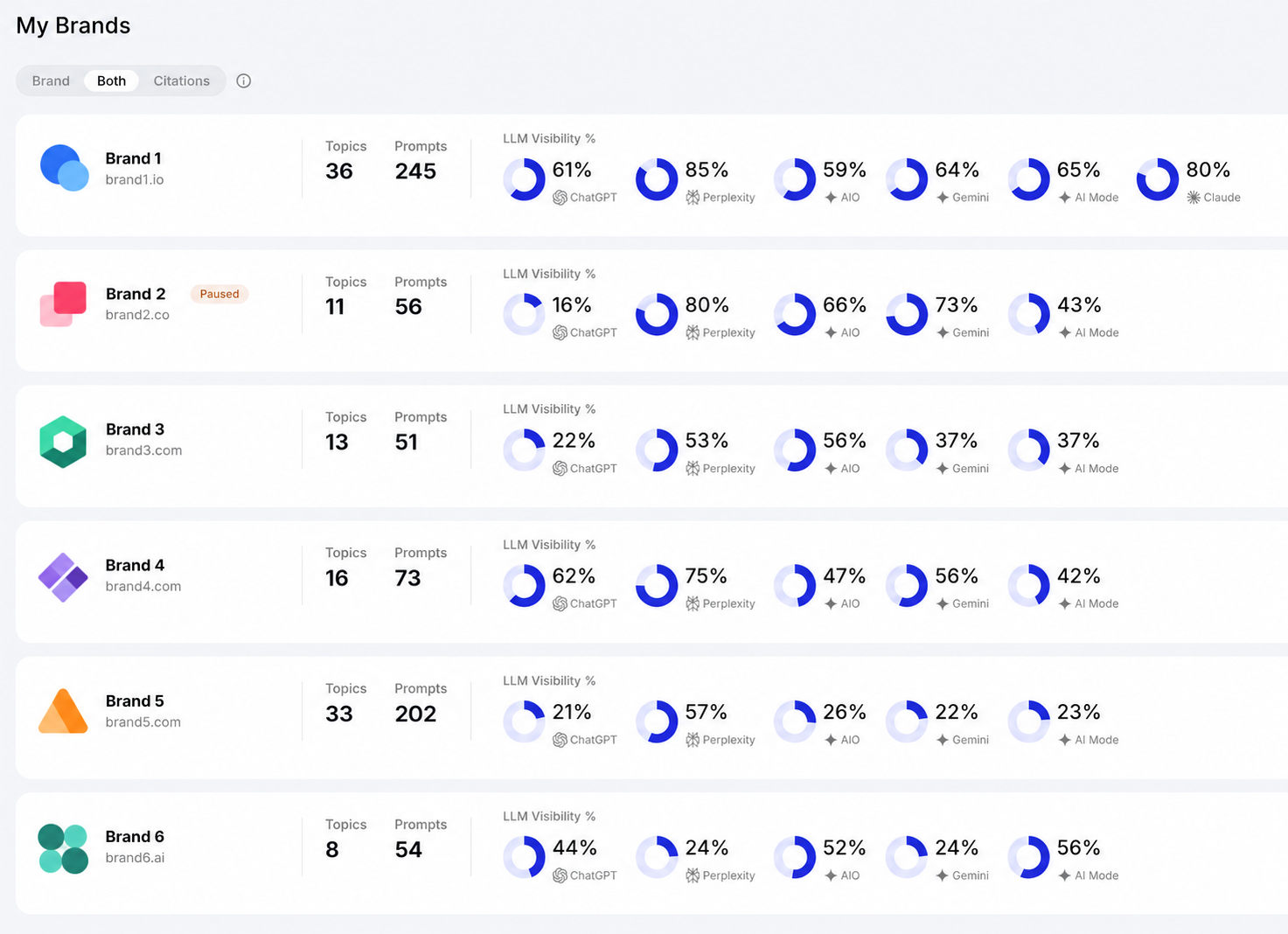
(tl;dr: real user prompts are personal and close to unique, so no single prompt can stand in for how buyers actually ask. A topic is a cluster of related buying questions, and the share of them that mention a brand, across repeated runs, gives you a rate that means something, while any one answer means almost nothing.)Track each LLM separately, for each brand. A brand can be recommended regularly on Perplexity and barely appear in ChatGPT for the same category, and Gemini behaves differently again, as do Google’s AI Overviews, AI Mode, and Claude too. In our published GEO work, an established brand measured between 59% and 85% visibility across the engines while a younger brand sat between 8% and 24%, which is two different stories per brand, per LLM. An average would have hidden both.
So the unit to report is each brand’s visibility rate on each LLM for each topic, and any combined view should be something you build deliberately for a specific purpose. The metrics we recommend paying attention to are covered in our guide to AI search visibility metrics.Separate mentions from citations, and read what the models actually say. A mention and a citation are different outcomes: being recommended by name in an answer is not the same as having a page used as a source, and each brand should be measured on both, separately.
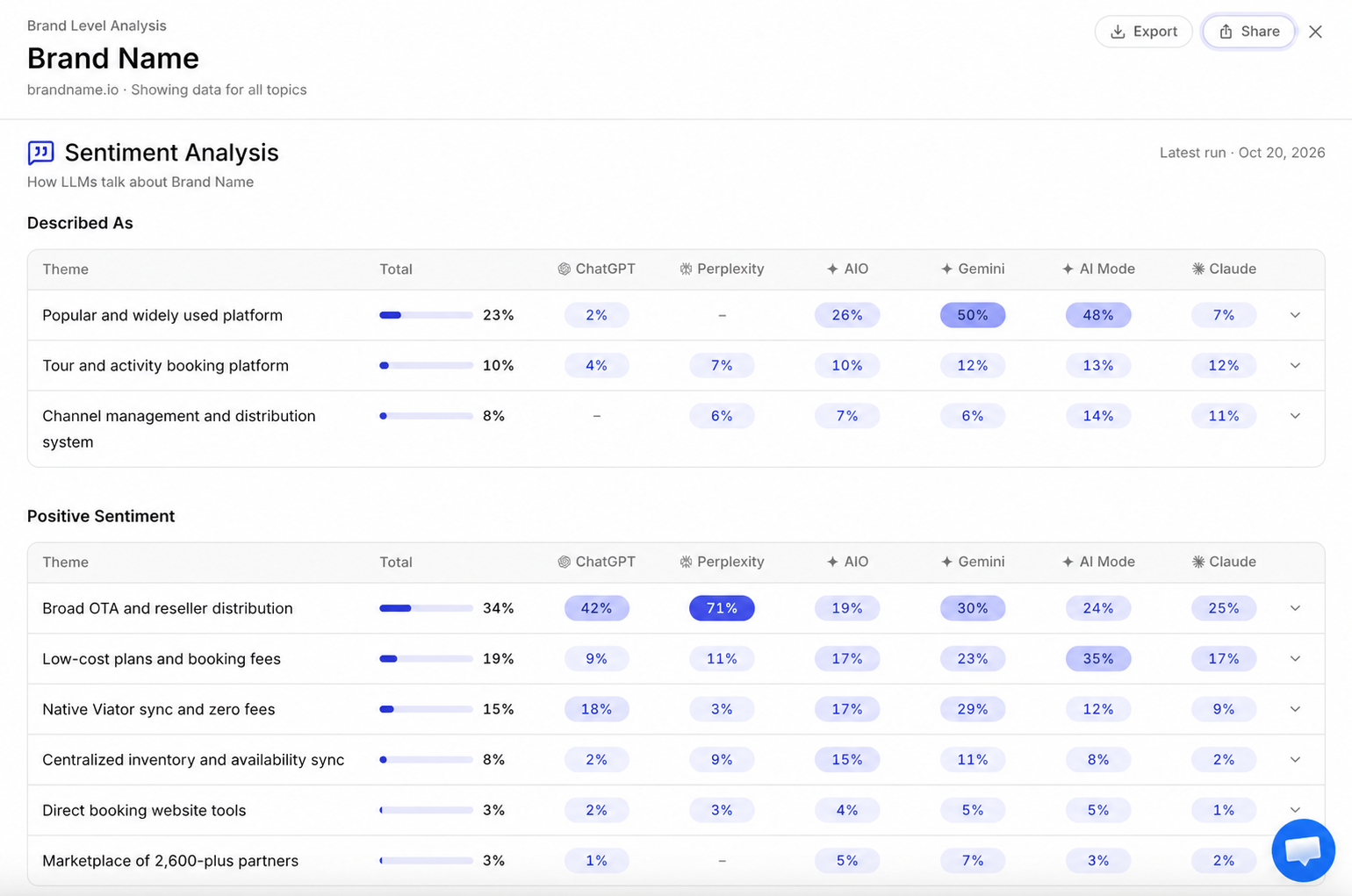
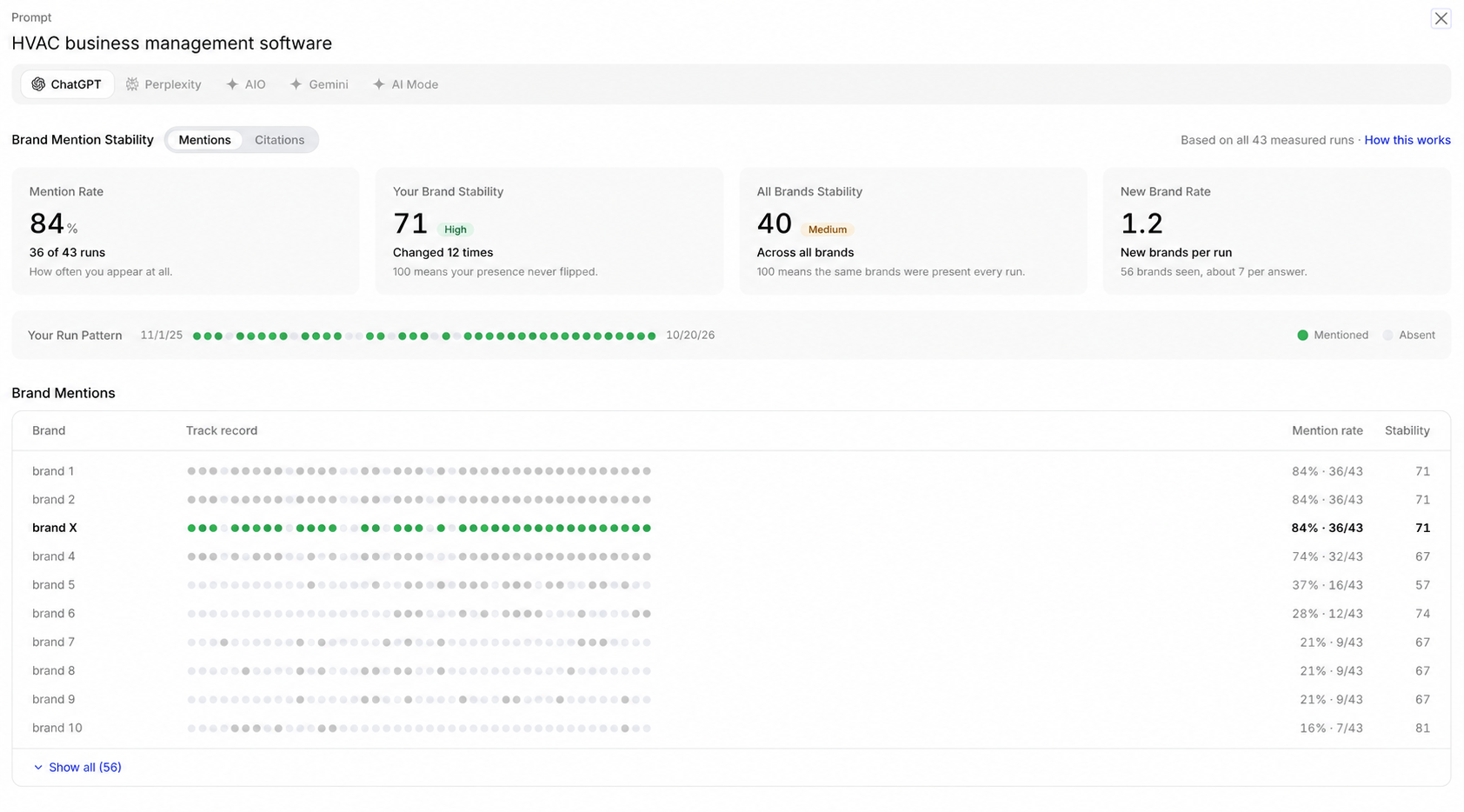
Beyond the mention counts, look at the characterizations and descriptions that appear in LLMs. Sentiment analysis shows the specific things each engine says each brand is, which matters most when you run several brands in adjacent markets and need to know whether the models describe them distinctly or interchangeably. (Our guide to AI brand monitoring goes deeper on this.)Run checks weekly, and read across runs rather than from single answers. Ask ChatGPT the same question twice and you’ll usually get different brands in a different order, so a one-off check mostly measures the moment you ran it. Weekly runs with a view across every run of every prompt give you something steadier, and the stability view in Traqer exists for exactly this. Date comparison then gives each brand a before-and-after for the work done on it, which is what turns the tracking into reporting.
Give each brand’s team its own login, and ask questions across the whole account. Whoever runs each brand should see their own data and nothing else, while the centre keeps admin, which Viewer roles and unlimited users make straightforward. For account-wide questions, Traqer includes an MCP server on every plan, so an AI assistant can answer things like “which of our brands gained ChatGPT visibility this month?” across everything at once.
How Traqer handles multiple brands
Traqer is organised around the above approach; we built it to run the dozens of brands we monitor ourselves at our agency. Every company is on one account as its own tracked brand, with its own topics, its own competitor set, and its own name variants. Nothing about one brand’s setup constrains another: a DTC brand can track shopping-led topics while a B2B brand on the same account tracks technical ones.
Each brand is reported per engine across ChatGPT, Copilot, Gemini, and Google’s AI Overviews and AI Mode, with Claude and Perplexity available as at-cost add-ons you switch on yourself.
Mentions and citations are counted separately for every brand, and sentiment analysis shows the specific things each engine says each brand is. The responses themselves are kept, from real logged-out sessions, with a screenshot of each, so anything in a report can be traced to the answer it came from.
Over time, the stability view shows every run of every prompt rather than only the latest, and a weekly refresh with date comparison gives each brand its own before-and-after.
At account level you can see all brands together and drill into any one of them, each brand’s team gets a Viewer login to its own data, and unlimited users means it is simple to add new brands whenever you want.
The MCP server works across the whole account, so you can ask an assistant things like “which of our brands lost Gemini visibility this month?” and get an answer that spans everything you track. For each topic, the Analyze & Improve view lists the sources the engines keep citing and the prompts where competitors are named and your brand isn’t, which is where the content work starts.
How much does it cost to track LLMs across multiple brands?
Many AI visibility tools charge per brand, per workspace, or on credits that multiply with every brand you add, which is why tracking twelve brands so often gets quoted at twelve times the price of one.
Traqer prices by tracked prompt instead, with unlimited brands and unlimited users on every plan, from $25 a month for 50 prompts. For example, let’s say you’re tracking ten brands at 25 prompts each.
That’s 250 prompts, the $100 a month plan, about $10 per brand, and adding an eleventh brand changes nothing unless you need to extend your number of prompts for it. Our wider reasoning on pricing in this category is outlined in our piece on affordable AI visibility solutions, and if you’re comparing between tools, our guide to AI visibility tracking tools for agencies tells you more about the various options.
Where to start with tracking multiple brands
A sensible first month: put every brand into a dashboard, give each a small set of topics you’ve edited yourself, run it weekly across ChatGPT, Gemini, Google’s AI Overviews and AI Mode (and Claude if your buyers use it), and bring the per-brand, per-engine numbers to your next reporting cycle. That’s enough to know where each brand stands and where the effort should go first.
Traqer has a 14-day free trial, no credit card required, and our pricing outlines the per-prompt model in full.
-
Traqer is built by Grow and Convert. For the measurement thinking behind it, Personalized GEO and Prioritized GEO explain the approach in more depth.